GpsTrackLogMap
・ Mark the position of the screen you want to mark a temporary * Name record you want to record a point
・ The position information read and display from kml files
・ Track position and point of saving kml format
・ load and display the location and point form kml files
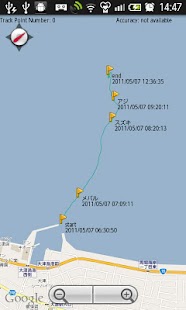
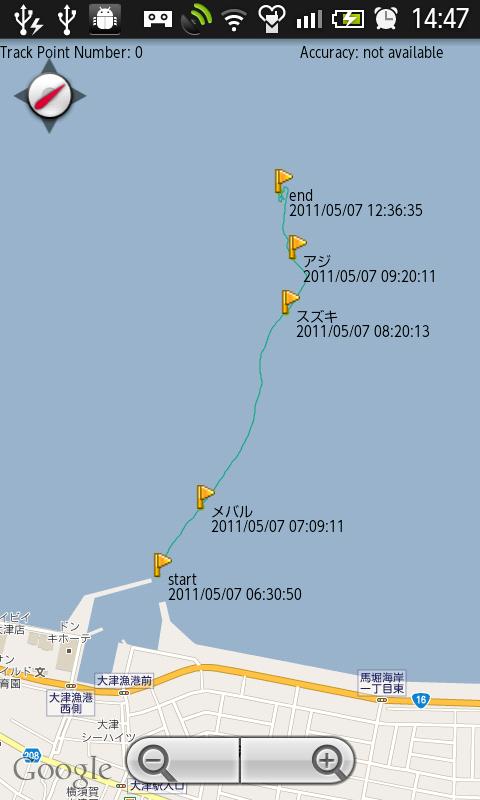
Track Point Number: Displays the number of recording tracks in the position.
The default is limited to 500.
Accuracy: Displays the current GPS measurement accuracy of meters.
○ Blue: current position
□ Red: the start of the measurement
Blue lines: Track
Green pin: the marked position
Blue Flag and character: point location, name, time
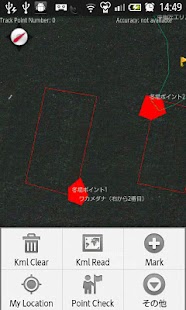
kml Clear: loading map (kml file) Clears the display.
kml Read: load kml file from "/sdcard/kagoturi/GpsTrackLogMap" and display.
Mark: the green pin, mark the current position.
My Location: the center of the screen to move the current position.
Point Check: point and recorded the name as the current position Display a blue flag.
Track Save: Track saved to a file being recorded.
Track Clear: to clear the Track Logging.
Setting: Perform the following settings.
Track Line Width: the width of lines to display log (1 point, 3 points, 5 points)
kml Line Width: kml file for compensation for the line thickness (x0.5, x1, x2)
Font Size: The size of the font used to display (12 points, 14 points, 16 points)
Max Point Number: The maximum number of records that track position(500,1000,2000)
Compass ON / OFF: Switch compass display, hidden
Satellite Mode ON / OFF: Switch between map views and satellite photographs
Accuracy circle ON/OFF: SwitchAccuracy circle, hidden
Gps Sleep ON / OFF: Switch enable GPS operations in the background / Disable
Edit File Name ON / OFF: Enable or disable editing of the file name.
Edit point Text: Edit the text to be used for point (Point A ~Point H)
When you start, SD cards are the following folders: Will be generated automatically.
/sdcard/kagoturi/GpsTrackLogMap
Please if you use a GPS enabled.
android 1.6 or higher
Verified soft bank: 003SH android 2.2 au:IS01 android 1.6
About GpsTrackLogMap
- Package name (App ID)
- com.tokyowanturi.gpstracklogmap
- Available on
- Google Play
- Price
- Free
- Version
- v1.2.0
Looking for the GpsTrackLogMap APK?
The safest way to get GpsTrackLogMap (com.tokyowanturi.gpstracklogmap) on your Android device is to install it directly from Google Play — you'll always get the latest official version, automatic updates, and no risk of modified or infected APK files from third-party sites.
Gaming Features
Enjoy immersive gaming experience with various game modes.
Camera Features
Advanced camera features with editing capabilities.
Weather Features
Get accurate weather forecasts and real-time updates.
See GpsTrackLogMap in Action
Frequently Asked Questions
Is GpsTrackLogMap free?
Yes, GpsTrackLogMap is free to download and install on Android through Google Play.
How do I install GpsTrackLogMap on Android?
Open Google Play on your Android phone or tablet, search for GpsTrackLogMap or tap the Google Play button on this page, then tap Install. The app downloads and installs automatically.
What is com.tokyowanturi.gpstracklogmap?
com.tokyowanturi.gpstracklogmap is the App ID (package name) of GpsTrackLogMap on Google Play. Every Android app has a unique package name, and it is the safest way to verify you are installing the official app.
Is GpsTrackLogMap safe to download?
Installing GpsTrackLogMap from Google Play is the safest option: you get the official version, verified by Google Play Protect, with automatic updates. Avoid APK files from unofficial third-party sites.

Get GpsTrackLogMap Today
GpsTrackLogMap for Android — free download on Google Play.
Compatible with Android phones and tablets — available on Google Play.
Ask AI about this app
Get instant answers about features, tips and more from popular AI assistants.